NEST Simulator target
NESTML features supported: neurons, synapses, vectors, delay differential equations, guards
Generates code for NEST Simulator. For a list of supported versions, see Compatibility with different versions of NEST.
After NESTML completes, the NEST extension module (by default called "nestmlmodule") can either be statically linked into NEST (see Writing an extension module), or loaded dynamically using the Install API call in Python.
Note
Several code generator options are available; for an overview see pynestml.codegeneration.nest_code_generator.NESTCodeGenerator.
NEST workflow example
A typical script for the NEST Simulator target could look like the following. First, import the function:
from pynestml.frontend.pynestml_frontend import generate_target

generate_target(input_path="/home/nest/work/pynestml/models",
                target_platform="NEST",
                target_path="/tmp/nestml_target")
We can also use a shorthand function for each supported target platform (here, NEST):
from pynestml.frontend.pynestml_frontend import generate_nest_target

generate_nest_target(input_path="/home/nest/work/pynestml/models",
                     target_path="/tmp/nestml_target")
To dynamically load a module with module_name equal to nestmlmodule (the default) in PyNEST can be done as follows:
nest.Install("nestmlmodule")
The NESTML models are then available for instantiation, for example as:
pre, post = nest.Create("neuron_nestml", 2)
nest.Connect(pre, post, "one_to_one", syn_spec={"synapse_model": "synapse_nestml"})
For more details on how to generate code for synaptic plasticity models, please refer to the section Generating code for plastic synapses.
Simulation loop
Note that NEST Simulator uses a hybrid integration strategy [Hanuschkin2010]; see fig_integration_order, panel A for a graphical depiction.
At the start of a timestep, the value is the one “just before” the update due to incoming spikes. Then, the code is run corresponding to the NESTML update block, which makes appropriate calls to integrate the necessary ODEs. After that, incoming spikes are processed, that is, the code corresponding to onReceive blocks is run and the values of variables corresponding to convolutions are updated.
Event-based updating of synapses
The synapse is allowed to contain an update block. Statements in the update block are executed whenever the internal state of the synapse is updated from one timepoint to the next; these updates are typically triggered by incoming spikes. The NESTML timestep() function will return the time that has elapsed since the last event was handled.
Synapses can have ODEs with linear and non-linear dynamics. In the case of linear dynamics, the ODEs are solved with the propagators provided by the ODE-toolbox; for non-linear dynamics, the ODEs are solved using a fourth order Runge-Kutta solver with adaptive timestep provided by GSL. Tolerance values can be specified at runtime as parameters of the model instance.
neurons = nest.Create(neuron_model, 2)
syn_spec = {"synapse_model": synapse_model, "gsl_abs_error_tol": 1E-12, "gsl_rel_error_tol": 1E-12}
nest.Connect(neurons[0], neurons[1], syn_spec=syn_spec)
If ODE-toolbox is not successful in finding the propagator solver to a system of ODEs that is, however, solvable, the propagators may be entered “by hand” in the update block of the model. This block may contain any series of statements to update the state of the system from the current timestep to the next, for example, multiplications of state variables by the propagators.
Setting and retrieving model properties
All variables in the state and parameters blocks are added to the status dictionary of the neuron. Note that the numerical values given in the NESTML models are defaults, and can be overridden when constructing the network, or even between different simulation runs.
Values can be set using the PyNEST API call node_collection.<variable> = <value> where <variable> is the name of the corresponding NESTML variable. Values can be read using the PyNEST API call node_collection.<variable>. This will return the value of the corresponding NESTML variable.
Recording values with devices
All values in the state block are recordable by a multimeter in NEST.
Solver selection
Currently, there is support for GSL, forward Euler, and exact integration. ODEs that can be solved analytically are integrated to machine precision from one timestep to the next. To allow more precise values for analytically solvable ODEs within a timestep, the same ODEs are evaluated numerically by the GSL solver. In this way, the long-term dynamics obeys the “exact” equations, while the short-term (within one timestep) dynamics is evaluated to the precision of the numerical integrator.
In the case that the model is solved with the GSL integrator, desired absolute error of an integration step can be adjusted with the gsl_error_tol parameter in a SetStatus call. The default value of gsl_error_tol is 1e-3.
Data types
The NESTML data type
realwill be rendered asdouble.The NESTML data type
integerwill be rendered aslong.
Manually building the extension module
Sometimes it can be convenient to directly edit the generated code. To manually build and install the NEST extension module, go into the target directory and run:
cmake -Dwith-nest=<nest_install_dir>/bin/nest-config .
make all
make install
where <nest_install_dir> is the installation directory of NEST (e.g. /home/nest/work/nest-install).
Gap junctions (electrical synapses)
Each neuron model can be endowed with gap junctions. The model does not need to be (necessarily) modified itself, but additional flags are passed during code generation that identify which model variables correspond to the membrane potential and the gap junction current. For instance, the code generator options can look as follows:
"gap_junctions": {
    "enable": True,
    "membrane_potential_variable": "V_m",
    "gap_current_port": "I_gap"
}
For a full example, please see test_gap_junction.py.
Multiple spiking input ports in NEST
See Multiple input ports to specify multiple spiking input ports in a neuron.
After generating and building the model code, a receptor_types entry is available in the status dictionary, which maps spike port names to numeric port indices in NEST. The receptor type can then be selected in NEST during connection setup:
neuron = nest.Create("iaf_psc_exp_multisynapse_neuron_nestml")

receptor_types = nest.GetStatus(neuron, "receptor_types")[0]

sg = nest.Create("spike_generator", params={"spike_times": [20., 80.]})
nest.Connect(sg, neuron, syn_spec={"receptor_type" : receptor_types["SPIKES_1"], "weight": 1000.})

sg2 = nest.Create("spike_generator", params={"spike_times": [40., 60.]})
nest.Connect(sg2, neuron, syn_spec={"receptor_type" : receptor_types["SPIKES_2"], "weight": 1000.})

sg3 = nest.Create("spike_generator", params={"spike_times": [30., 70.]})
nest.Connect(sg3, neuron, syn_spec={"receptor_type" : receptor_types["SPIKES_3"], "weight": 500.})
Note that in multisynapse neurons, spiking receptor ports are numbered starting from 1.
We furthermore wish to record the synaptic currents I_kernel1, I_kernel2 and I_kernel3. During code generation, one buffer is created for each combination of (kernel, spike input port) that appears in convolution statements. These buffers are named by joining together the name of the kernel with the name of the spike buffer using (by default) the string “__X__”. The variables to be recorded are thus named as follows:
mm = nest.Create('multimeter', params={'record_from': ['I_kernel1__X__spikes_1',
                                                       'I_kernel2__X__spikes_2',
                                                       'I_kernel3__X__spikes_3'],
                                       'interval': .1})
nest.Connect(mm, neuron)
The output shows the currents for each synapse (three bottom rows) and the net effect on the membrane potential (top row):
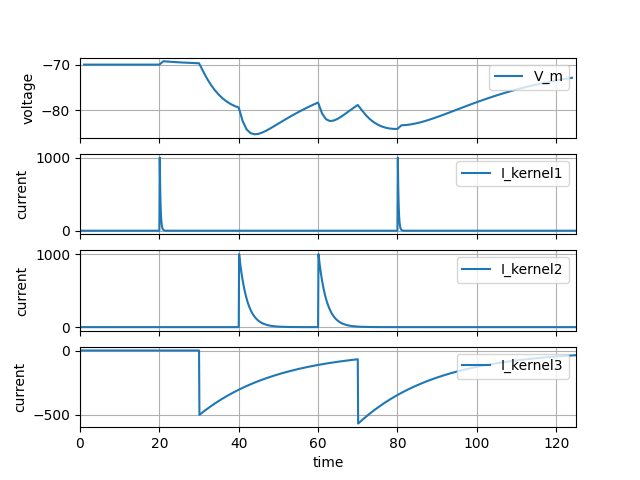
For a full example, please see iaf_psc_exp_multisynapse.nestml for the full model and test_multisynapse in tests/nest_tests/nest_multisynapse_test.py for the corresponding test harness that produced the figure above.
See Multiple input ports with vectors for an example with input ports defined as vectors.
Each connection in NEST is denoted by a receiver port or rport number which is an integer that starts with 0. All default connections in NEST have the rport 0.
During the code generation for NEST, NESTML maintains an internal mapping between NEST rports and NESTML input ports. A list of port names defined in a model and their corresponding rport numbers can be queried from the status dictionary using the NEST API. For neurons with multiple input ports, the receptor_type values in the nest.Connect() call start from 1 as the default receptor_type 0 is excluded to avoid any accidental connections.
For the example mentioned here, the receptor_types can be queried as shown below:
neuron = nest.Create("multi_synapse_vectors")
receptor_types = nest.GetStatus(neuron, "receptor_types")
The name of the receptors of the input ports are denoted by suffixing the string __VEC_IDX__ and the vector index (an integer) to the port name. For instance, the receptor name for foo[0] would be FOO__VEC_IDX__0.
The above code querying for receptor_types gives a list of port names and NEST rport numbers as shown below:
Input port name |
NEST |
|---|---|
AMPA_spikes |
1 |
GABA_spikes |
1 |
NMDA_spikes |
2 |
FOO__VEC_IDX__0 |
3 |
FOO__VEC_IDX__1 |
4 |
EXC_SPIKES__VEC_IDX__0 |
5 |
EXC_SPIKES__VEC_IDX__1 |
6 |
EXC_SPIKES__VEC_IDX__2 |
7 |
INH_SPIKES__VEC_IDX__0 |
5 |
INH_SPIKES__VEC_IDX__1 |
6 |
INH_SPIKES__VEC_IDX__2 |
7 |
For a full example, please see iaf_psc_exp_multisynapse_vectors.nestml for the neuron model and test_multisynapse_with_vector_input_ports in tests/nest_tests/nest_multisynapse_test.py for the corresponding test.
Multiple continuous input ports in NEST
See Multiple input ports to specify multiple continuous input ports in a neuron.
After generating and building the model code, a continuous_inputs entry is available in the status dictionary, which maps continuous port names to numeric port indices in NEST. The receptor type can then be selected in NEST during connection setup:
continuous_inputs = nest.GetStatus(neuron, "continuous_inputs")[0]

dc1 = nest.Create("dc_generator", params={"amplitude": 150.0})
nest.Connect(dc1, neuron, syn_spec={'receptor_type': continuous_inputs["I_STIM1"]})

dc2 = nest.Create("dc_generator", params={"amplitude": 225.0})
nest.Connect(dc2, neuron, syn_spec={'receptor_type': continuous_inputs["I_STIM2"]})
Note that the receptor ports for continuous input ports are numbered starting from 0.
Generating code
Generating code for plastic synapses
Synaptic and neuronal models should ideally be formulated independently of each other, so that each neuron can be combined with each synapse for maximum flexibility. When a synaptic plasticity rule (such as STDP) is formulated as a computational model, the plasticity rule is often expressed as a function of the timing of pre- and postsynaptic spikes, which are used in the dynamics of the weight update for that particular rule. Note that as each neuron is typically connected to hundreds or thousands of other neurons via synapses on its dendritic arbor, each of those synapses will observe the same postsynaptic spike times, and store and numerically integrate them in exactly the same way, causing a very large redundancy in memory and computation.
To prevent this redundancy, these values should only be stored and computed once; ideally in the instances of the neuron models, where the spike timings are readily available. To achieve this, NESTML has the capability to process a synapse model as a pair together with the (postsynaptic) neuron model that it will connect to when the network is instantiated in the simulation. A list of these (neuron, synapse) pairs can be provided as code generator options when invoking the NESTML toolchain to generate code. During code generation, state variables that depend only on postsynaptic spike timing are then automatically identified and moved from the NESTML synapse model into the neuron model by the toolchain. In the generated code, at the points where the respective variables are used by the synapse (for instance, where they are used in calculating the change in synaptic strength), the variable references are replaced by function calls into the postsynaptic neuron instance. All parameters that are only used by these postsynaptic dynamics (for instance, time constants) are also moved to reduce the memory requirements for the synapse. Detecting and moving the state, parameters, and dynamics (ODEs) from synapse to neuron is carried out fully autonomously. We refer to this feature as the “co-generation” of neuron and synapse. It enables flexibility and separation of concerns in the model formalisations without compromising on performance.
When NESTML is invoked to generate code for plastic synapses, the synapses that will be co-generated with the postsynaptic neuron can be specified as a list of dictionaries of the form {"neuron": "neuron_model_name", "synapses": {"synapse_model_name": ...}}, for example:
generate_target(...,
                codegen_opts={...,
                              "neuron_synapse_pairs": [{"neuron": "iaf_psc_exp_neuron",
                                                        "synapses": {"stdp_synapse": {}}}]})
Note
In NEST, synapses derive from the C++ class Connection, whereas neurons derive from Node. To make it clear to the code generator whether a given NESTML model is a neuron or synapse model, the code generator option synapse_models can be used. If the model name ends with the string "synapse" (for instance, "stdp_synapse"), the model is automatically interpreted as a synapse.
Additionally, if the synapse requires it, specify the "post_ports" entry to connect the input port on the synapse with the right variable of the postsynaptic neuron:
generate_target(...,
                codegen_opts={...,
                              "neuron_synapse_pairs": [{"neuron": "iaf_psc_exp_neuron",
                                                        "synapses": {"stdp_synapse": {"post_ports": ["post_spikes"]}}}]})
This specifies that the neuron iaf_psc_exp has to be generated paired with the synapse stdp_synapse, and that the (spiking) input port post_spikes in the synapse is to be connected to the postsynaptic partner.
Owing to the “co-generation” of neuron and synapse models, NESTML generates the model names with the associated neuron and synapse names. For the example above, the neuron name is changed to "iaf_psc_exp__with_stdp_synapse", and similarly, the synapse name to "stdp_synapse__with_iaf_psc_exp" during the code generation. Note that the modified neuron and synapse model names must be used in the simulation script for creating neurons and connections.
Alternatively, the modified model names can also be obtained using NESTCodeGeneratorUtils.generate_code_for(), which internally calls the generate_nest_target() function, and returns the modified model names. For example:
module_name, neuron_model_name, synapse_model_name = \
                 NESTCodeGeneratorUtils.generate_code_for("iaf_psc_exp_neuron.nestml",
                                                          "stdp_synapse.nestml",
                                                          post_ports=["post_spikes"],
                                                          logging_level="WARNING",
                                                          codegen_opts={...}})
Note
This function will create temporary paths for the generated code. This is especially useful in a Jupyter notebook, where the same cell (that invokes the code generation) may be run over and over again. For more control over where the code is generated, please use the function pynestml.frontend.pynestml_frontend.generate_nest_target().
To prevent the NESTML code generator from moving specific variables from synapse into postsynaptic neuron, the code generation option strictly_synaptic_vars may be used (see pynestml.transformers.synapse_post_neuron_transformer.SynapsePostNeuronTransformer).
Third-factor plasticity
A synapse model can also have a “third factor” (in addition to pre and post-synaptic spikes) influencing the plasticity of the synapse. For example, a third factor to a synapse could be the dendritic action potential of its post-synaptic partner.
During code generation, the third-factor variable of the synapse and its corresponding post-synaptic variable must be provided in the codegen_opts. For example:
generate_target(...,
                codegen_opts={...,
                              "neuron_synapse_pairs": [{"neuron": "iaf_psc_exp_dend_neuron",
                                                        "synapses": {"third_factor_stdp_synapse": {"post_ports": [["I_post_dend", "I_dend"]]}}}]})
This specifies that the neuron iaf_psc_exp_dend_neuron has to be generated paired with the synapse third_factor_stdp_synapse, and that the (continuous-time) input port I_post_dend in the synapse is to be connected to the postsynaptic partner. The corresponding variable in the (postsynaptic) neuron is called I_dend. Note that inline expressions can also be used; in this example I_dend could equivalently have been an inline expression in the postsynaptic neuron.
When a continuous-time input port is defined in the synapse model which is connected to a postsynaptic neuron, a corresponding buffer is allocated in each neuron which retains the recent history of the needed state variables. Two options are available for how the buffer is implemented: a “continuous-time” based buffer, or a spike-based buffer (see the NEST code generator option continuous_state_buffering_method on pynestml.codegeneration.html#pynestml.codegeneration.nest_code_generator.NESTCodeGenerator).
By default, the “continuous-time” based buffer is selected. This covers the most general case of different synaptic delay values and a discontinuous third-factor signal. The implementation corresponds to the event-based update scheme in Fig. 4b of [Stapmanns2021]. There, the authors observe that the storage and management of such a buffer can be expensive in terms of memory and runtime. In each time step, the value of the current dendritic current (or membrane potential, or other third factor) is appended to the buffer. The maximum length of the buffer depends on the maximum inter-spike interval of any of the presynaptic neurons.
As a computationally more efficient alternative, a spike-based buffer can be selected. In this case, the third factor is not stored every timestep, but only upon the occurrence of postsynaptic (somatic) spikes. Because of the existence of a nonzero dendritic delay, the time at which the somatic spike is observed at the synapse is delayed, and the time at which the third factor is sampled should match the time of the spike at the synapse, rather than the soma. When the spike-based buffering method is used, the dendritic delay is therefore ignored, because the third factor is sampled instead at the time of the somatic spike.
Simulation of volume-transmitted neuromodulation in NEST can be done using “volume transmitter” devices [5]_. These are event-based and should correspond to a “spike” type input port in NESTML. The code generator options keyword "vt_ports" can be used here.
generate_target(...,
                codegen_opts={...,
                              "neuron_synapse_pairs": [{"neuron": "iaf_psc_exp_dend_neuron",
                                                        "synapses": {"third_factor_stdp_synapse": {...}},
                                                        "vt_ports": ["dopa_spikes"]}]})
Multiple synapses
Any number of synapse models can be used in combination with one postsynaptic neuron model. Each synapse can be specified individually in the neuron_synapse_pairs code generator option, and for each synapse, any number of third factors as well as a volume transmitter port can optionally be specified, for instance as follows:
generate_nest_target(...,
                     codegen_opts={"neuron_synapse_pairs": [{"neuron": "iaf_psc_exp_neuron",
                                                             "synapses": {"stdp_nn_symm_vt_synapse": {"post_ports": ["post_spikes"],
                                                                                                      "vt_ports": ["mod_spikes"]},
                                                                          "stdp_nn_restr_symm_synapse": {"post_ports": ["post_spikes"]}},
                                                             ...}]})
For a full demonstration of this feature, please see test_neuron_with_multiple_different_plastic_synapses.py.
Synaptic delay
Third-factor plasticity
When a continuous-time input port is defined in the synapse model which is connected to a postsynaptic neuron, a corresponding buffer is allocated in each neuron which retains the recent history of the needed state variables. Two options are available for how the buffer is implemented: a “continuous-time” based buffer, or a spike-based buffer (see the NEST code generator option continuous_state_buffering_method on https://nestml.readthedocs.io/en/latest/pynestml.codegeneration.html#pynestml.codegeneration.nest_code_generator.NESTCodeGenerator).
By default, the “continuous-time” based buffer is selected. This covers the most general case of different synaptic delay values and a discontinuous third-factor signal. The implementation corresponds to the event-based update scheme in Fig. 4b of [Stapmanns2021]. There, the authors observe that the storage and management of such a buffer can be expensive in terms of memory and runtime. In each time step, the value of the current dendritic current (or membrane potential, or other third factor) is appended to the buffer. The maximum length of the buffer depends on the maximum inter-spike interval of any of the presynaptic neurons.
As a computationally more efficient alternative, a spike-based buffer can be selected. In this case, the third factor is not stored every timestep, but only upon the occurrence of postsynaptic (somatic) spikes. Because of the existence of a nonzero dendritic delay, the time at which the somatic spike is observed at the synapse is delayed, and the time at which the third factor is sampled should match the time of the spike at the synapse, rather than the soma. When the spike-based buffering method is used, the dendritic delay is therefore ignored, because the third factor is sampled instead at the time of the somatic spike.
Dendritic delays
In NEST, all synapses are expected to specify a nonzero dendritic delay, that is, the delay between arrival of a spike at the dendritic spine and the time at which its effects are felt at the soma (or conversely, the delay between a somatic action potential and the arrival at the dendritic spine due to dendritic backpropagation). Dendritic delays are managed entirely by NEST and can in principle not be read from or written to from inside the NESTML model. However, in some cases it can be useful to read the delay from inside the synapse. This can be achieved by using the code generator option delay_variable.
For example, given the following model:
model my_synapse:
    parameters:
        d ms = 1 ms
the variable might be specified as:
generate_target(...,
                codegen_opts={...,
                              "delay_variable": {"my_synapse": "d"}})
The parameter can then be set in NEST:
nest.Connect(pre, post, syn_spec={"delay": 2.5})
and subsequently read out from NESTML:
model my_synapse:
    onReceive(pre_spikes):
        print("dendritic delay = {d}")
This will print the string dendritic_delay = 2.5.
Synaptic weights
model my_synapse:
    state:
        w real = 1.
the variable might be specified as:
generate_target(...,
                codegen_opts={...,
                              "weight_variable": {"my_synapse": "w"}})
Custom templates
Compatibility with different versions of NEST
To generate code that is compatible with particular versions of NEST Simulator, the code generator option nest_version can be used. The option value is given as a string that corresponds to a git tag or git branch name. The following values are supported:
The default is the empty string, which causes the NEST version to be automatically identified from the
nestPython module."main": Latest NEST GitHub main branch version (https://github.com/nest/nest-simulator/)."v2.20.2": Latest NEST 2 release."v3.0","v3.1","v3.2", etc.: NEST 3 release versions.
For a list of the corresponding NEST Simulator repository tags, please see https://github.com/nest/nest-simulator/tags.
Random numbers
In case random numbers are needed inside the synapse, the random number generator belonging to the postsynaptic target is used.
Running with MPI
When running NEST simulation scripts via MPI, make sure to run the NESTML code generation step in a separate, single-process script first. This then produces a dynamic library (.so or .dll file) that can be used in the MPI context (using nest.Install()). Running NESTML itself in the MPI context would result in compilation/build errors.
Performance optimisations
In neuron models, incoming spikes are by default buffered into a queue (a std::vector) before being processed. This implementation is the most generic, allowing, for example, spikes with both positive and negative weights arriving at one and the same input port to be handled differently according to the sign. However, the queue can cause a degradation in runtime performance on the order of 10%. If no conditional processing of the incoming spikes is necessary, and all spikes are treated in the same, linear, time-invariant (LTI) manner, then no queue is necessary as all spike weights can be simply added together into a single floating-point variable. The code generator option linear_time_invariant_spiking_input_ports can be used to indicate for which ports the spikes can be treated in an LTI-manner.
For instance, if spikes arriving at the same port are handled differently according to sign of the weight:
internals:
    unit_psc pA = 1 pA        # Unitary postsynaptic current amplitude

input:
    spike_in_port <- spike

onReceive(spike_in_port):
    # route the incoming spike on the basis of the weight: less than zero means an inhibitory spike; greater than zero means an excitatory spike
    psc pA = unit_psc * sift(spike_in_port, t)    # obtain the postsynaptic current by integrating area under the curve of the spike
    if psc > 0:
        I_syn_exc += psc
    else:
        I_syn_inh -= psc
then the system is not LTI and a queue is necessary.
However, if two separate ports are used (and weights are subsequently processed in an LTI manner), the model can be formulated in a mathematically equivalent way:
internals:
    unit_psc pA = 1 pA        # Unitary postsynaptic current amplitude

input:
    spike_in_port_exc <- spike
    spike_in_port_inh <- spike

onReceive(spike_in_port_exc):
     I_syn_exc += unit_psc * sift(spike_in_port_exc, t)

onReceive(spike_in_port_inh):
     I_syn_inh += unit_psc * sift(spike_in_port_inh, t)
In this case, the linear_time_invariant_spiking_input_ports option can be used to specify that both spike_in_port_exc and spike_in_port_inh are LTI ports, for better runtime performance.
References
Alexander Hanuschkin and Susanne Kunkel and Moritz Helias and Abigail Morrison and Markus Diesmann. A General and Efficient Method for Incorporating Precise Spike Times in Globally Time-Driven Simulations. Frontiers in Neuroinformatics, 2010, Vol. 4