NESTML language concepts
Structure and indentation
NESTML uses Python-like indentation to group statements into blocks. Leading whitespace (spaces or tabs) determine the level of indentation. There is no prescribed indentation depth, as long as each individual block maintains a consistent level. To indicate the end of a block, the indentation of subsequent statements (after the block) must again be on the same indentation level as the code before the block has started. The different kinds of blocks can be Functions, Control structures, or any of the blocks in Block types. As an example, the following model is written with our recommended indentation level of 4 spaces:
model test:
    state:
        foo integer = 42
        bar s = 0 s

    update:
        if foo > 42:
            bar += 1 ms
        else:
            bar -= 1 ms
Similar to Python, a single line can be split into multiple lines by using a backslash (\). For example, the expression in the update block of the model below is split into multiple lines using this technique.
model test:
    state:
        tau ms = 42 ms
        foo s = 0 s

    update:
        foo = tau > 0 \
            ? foo + 1 \
            : foo - 1
Data types and physical units
Data types define types of variables, as well as parameters and return values of functions. NESTML provides the following primitive types and physical data types, which can both be used to indicate types.
Primitive data types
realindicates a real number. Example literals are:42.0,-0.42,.44integerindicates a natural number (signed integer). Example literals are:42,-7booleanindicates a Boolean value. Its only literals aretrueandfalsestringindicates a text string. Example literals are:"Bob","","Hello World!"voidcan only be used in the declaration of a function to indicate that it does not return a value.
Physical units
A physical unit in NESTML can be either a base physical unit or a derived physical unit. The following table lists the seven base units as defined in the SI standard.
|
|
|
Any other physical unit can be expressed as a combination of these seven units. For this, the operators * (multiplication), / (division), ** (power) and () (parentheses) can be used (see below for examples).
NESTML also supports the usage of many named derived units such as Newton, Henry or lux. The following units are defined:
Name |
Symbol |
Quantity |
In other SI units |
In base SI units |
|---|---|---|---|---|
radian |
rad |
angle |
m⋅m-1 |
|
steradian |
sr |
solid angle |
m2⋅m−2 |
|
Hertz |
Hz |
frequency |
s−1 |
|
Newton |
N |
force, weight |
kg⋅m⋅s−2 |
|
Pascal |
Pa |
pressure, stress |
N/m2 |
kg⋅m−1⋅s−2 |
Joule |
J |
energy, work, heat |
N⋅m=Pa⋅m3 |
kg⋅m2⋅s−2 |
Watt |
W |
power, radiant flux |
J/s |
kg⋅m2⋅s−3 |
Coulomb |
C |
electric charge or quantity of electricity |
s⋅A |
|
Volt |
V |
voltage (electrical potential), emf |
W/A |
kg⋅m2⋅s−3⋅ A−1 |
Farad |
F |
capacitance |
C/V |
kg−1⋅ m−2⋅ s4⋅ A2 |
Ohm |
Ohm |
resistance, impedance, reactance |
V/A |
kg⋅(m2) ⋅ (s−3) ⋅(A−2) |
Siemens |
S |
electrical conductance |
Ohm−1 |
(kg−1) ⋅(m−2) ⋅(s3) ⋅ A2 |
Weber |
Wb |
magnetic flux |
V⋅s |
kg⋅(m2) ⋅(s−2) ⋅(A−1) |
Tesla |
T |
magnetic flux density |
Wb/m2 |
kg⋅(s−2) ⋅(A−1) |
Henry |
H |
inductance |
Wb/A |
kg⋅(m2) ⋅(s−2) ⋅(A−2) |
lumen |
lm |
luminous flux |
cd⋅sr |
cd |
lux |
lx |
illuminance |
lm/m2 |
m−2⋅ cd |
Becquerel |
Bq |
radioactivity (decays per unit time) |
s−1 |
|
Gray |
Gy |
absorbed dose (of ionizing radiation) |
J/kg |
(m2)⋅(s−2) |
Sievert |
Sv |
equivalent dose (of ionizing radiation) |
J/kg |
(m2)⋅ (s−2) |
katal |
kat |
catalytic activity |
mol⋅(s−1) |
These unit symbols can be used to define physical quantites, for instance:
x N/A = 10 N * 22 Ohm / 0.5 V
Physical units can have at most one of the following magnitude prefixes:
Factor |
SI Name |
NESTML prefix |
Factor |
SI Name |
NESTML prefix |
|---|---|---|---|---|---|
10^-1 |
deci |
d |
10^1 |
deca |
da |
10^-2 |
centi |
c |
10^2 |
hecto |
h |
10^-3 |
milli |
m |
10^3 |
kilo |
k |
10^-6 |
micro |
u |
10^6 |
mega |
M |
10^-9 |
nano |
n |
10^9 |
giga |
G |
10^-12 |
pico |
p |
10^12 |
tera |
T |
10^-15 |
femto |
f |
10^15 |
peta |
P |
10^-18 |
atto |
a |
10^18 |
exa |
E |
10^-21 |
zepto |
z |
10^21 |
zetta |
Z |
10^-24 |
yocto |
y |
10^24 |
yotta |
Y |
For example, the following defines a possible unit:
mV*mV*nS**2/(mS*pA)
Units of the form <unit>**-1 can also be expressed as 1/<unit>. For example
(ms*mV)**-1
is equivalent to
1/(ms*mV)
Type and unit checks
NESTML checks type correctness of all expressions. This also applies to assignments, declarations with an initialization, ODEs, and function calls. Conversion of integers to reals is allowed. A conversion between unit-typed and real-typed variables is also allowed. However, these conversions are reported as warnings. No conversion is allowed between numeric types and Boolean or string types.
Basic elements of the embedded programming language
The basic elements of the language are declarations, assignments, function calls and return statements.
Declarations
Declarations are composed of a non-empty list of comma separated names. A valid name starts with a letter, an underscore or the dollar character. Furthermore, it can contain an arbitrary number of letters, numbers, underscores and dollar characters. Formally, a valid name satisfies the following regular expression:
( 'a'..'z' | 'A'..'Z' | '_' | '$' )( 'a'..'z' | 'A'..'Z' | '_' | '0'..'9' | '$' )*
Names of functions and input ports must also satisfy this pattern. The type of the declaration can be any of the valid NESTML types. The type of the initialization expression must be compatible with the type of the declaration.
<list_of_comma_separated_names> <type> (= initialization_expression)?
a, b, c real = -0.42
d integer = 1
n integer # default value is 0
e string = "foo"
f mV = -2e12 mV
It is legal to define a variable (or kernel, or parameter) with the same name as a physical unit, but this could lead to confusion. For example, defining a variable with name b creates an ambiguity with the physical unit b, a unit of surface area. In these cases, a warning is issued when the model is processed. The variable (or kernel, and parameter) definitions will then take precedence when resolving symbols: all occurrences of the symbol in the model will be resolved to the variable rather than the unit.
For example, the following model will result in one warning and one error:
model test:
    state:
        ms mA = 42 mA   # redefine "ms" (from milliseconds unit to variable name)
        foo s = 0 s     # foo has units of time (seconds)

    update:
        ms = 1 mA    # WARNING: Variable 'ms' has the same name as a physical unit!
        foo = 42 ms  # ERROR: Actual type different from expected. Expected: 's', got: 'mA'!
Assignments
NESTML supports simple or compound assignments. The left-hand side of the assignment is always a variable. The right-hand side can be an arbitrary expression of a type which is compatible with the left-hand side.
Examples for valid assignments for a numeric variable n are
simple assignment:
n = 10compound sum:
n += 10which corresponds ton = n + 10compound difference:
n -= 10which corresponds ton = n - 10compound product:
n *= 10which corresponds ton = n * 10compound quotient:
n /= 10which corresponds ton = n / 10
Vectors
Variables can be declared as vectors to store an array of values. They can be declared in the parameters, state, and internals blocks. See Block types for more information on different types of blocks available in NESTML.
The declaration of a vector variable consists of the name of the variable followed by the size of the vector enclosed in [ and ]. The vector must be initialized with a default value and all the values in the vector will be initialized to the specified initial value. For example,
parameters:
    g_ex [20] mV = 10mV
Here, g_ex is a vector of size 20 and all the elements of the vector are initialized to 10mV. Note that the vector index always starts from 0.
Size of the vector can be a positive integer or an integer variable previously declared in either parameters or internals block. For example, an integer variable named ten declared in the parameters block can be used to specify the size of the vector variable g_ex as:
state:
    g_ex [ten] mV = 10mV
    x [12] real = 0.

parameters:
    ten integer = 10
If the size of a vector is a variable (as ten in the above example), the vector will be resized if the value of size variable changes during the simulation. On the other hand, the vector cannot be resized if the size is a fixed integer value.
Vector variables can be used in expressions as an array with an index. For example,
state:
    g_ex [ten] mV = 10mV
    x[15] real = 0.

parameters:
    ten integer = 10

update:
    integer j = 0
    g_ex[2] = -55. mV
    x[j] = g_ex[2]
    j += 1
Functions
Functions can be used to write repeatedly used code blocks only once. They consist of the function name, the list of parameters and an optional return type, if the function returns a value to the caller.
function <name>(<list_of_arguments>) <return_type>?:
    <statements>
e.g.:
function divide(a real, b real) real:
    return a/b
To use a function, it has to be called. A function call is composed of the function name and the list of required parameters. The returned value (if any) can be directly assigned to a variable of the corresponding type.
<function_name>(<list_of_arguments>)
e.g.
x = max(a*2, b/2)
Predefined functions
The following functions are predefined in NESTML and can be used out of the box. No user-defined functions can have the same name.
Name |
Parameters |
Description |
|---|---|---|
|
x, y |
Returns the minimum of x and y. Both parameters should be of the same type. The return type is equal to the type of the parameters. |
|
x, y |
Returns the maximum of x and y. Both parameters should be of the same type. The return type is equal to the type of the parameters. |
|
x |
Returns the absolute value of x. The return type is equal to the type of x. |
|
x, y, z |
Returns x if it is in [y, z], y if x < y and z if x > z. All parameter types should be the same and equal to the return type. |
|
x |
Returns the exponential of x. The type of x and the return type are Real. |
|
x |
Returns the base 10 logarithm of x. The type of x and the return type are Real. |
|
x |
Returns the base \(e\) logarithm of x. The type of x and the return type are Real. |
|
x |
Returns the exponential of x minus 1. The type of x and the return type are Real. |
|
x |
Returns the sine of x. The type of x and the return type are Real. |
|
x |
Returns the cosine of x. The type of x and the return type are Real. |
|
x |
Returns the tangent of x. The type of x and the return type are Real. |
|
x |
Returns the hyperbolic sine of x. The type of x and the return type are Real. |
|
x |
Returns the hyperbolic cosine of x. The type of x and the return type are Real. |
|
x |
Returns the hyperbolic tangent of x. The type of x and the return type are Real. |
|
x |
Returns the error function of x. The type of x and the return type are Real. |
|
x |
Returns the complementary error function of x. The type of x and the return type are Real. |
|
x |
Returns the ceil of x. The type of x and the return type are Real. |
|
x |
Returns the floor of x. The type of x and the return type are Real. |
|
x |
Returns the rounded value of x. The type of x and the return type are Real. |
|
mean, std |
Returns a sample from a normal (Gaussian) distribution with parameters “mean” and “standard deviation” |
|
rate |
Returns a sample from a Poissonian distribution with rate parameter (expected value) “rate”. |
|
offset, scale |
Returns a sample from a uniform distribution in the interval [offset, offset + scale) |
|
t |
A Dirac delta impulse function at time t. |
|
f, g |
The convolution of kernel f with spike input port g. |
|
s |
Log the string s with logging level “info”. |
|
s |
Log the string s with logging level “warning”. |
|
s |
Print the string s to stdout (no line break at the end). See Print function for more information. |
|
s |
Print the string s to stdout (with a line break at the end). See Print function for more information. |
|
This function can be used to integrate all stated differential equations of the equations block. |
|
|
Calling this function in the update block results in firing a spike to all target neurons and devices time stamped with the current simulation time. |
|
|
t |
Convert a time into a number of simulation steps. See the section Handling of time for more information. |
|
In the |
|
|
In the |
Predefined variables and constants
The following variables and constants are predefined in NESTML and can be used out of the box. No user-defined variables can have the same name.
Name |
Description |
|---|---|
|
The current simulation time (read only) |
|
Euler’s constant (2.718…) |
|
pi (3.14159…) |
|
Floating point infinity |
Return statement
The return keyword can only be used inside of the function block. Depending on the return type (if any), it is followed by an expression of that type.
return (<expression>)?
e.g.
if a > b:
    return a
else:
    return b
Print function
The print and println functions print a string to the standard output, with println printing a line break at the end. They can be used in the update block. See Block types for more information on the update block.
Example:
update:
    print("Hello World")
    ...
    println("Another statement")
Variables defined in the model can be printed by enclosing them in { and }. For example, variables V_m and V_thr used in the model can be printed as:
update:
    ...
    print("A spike event with membrane voltage: {V_m}")
    ...
    println("Membrane voltage {V_m} is less than the threshold {V_thr}")
Control structures
To control the flow of execution, NESTML supports loops and conditionals.
Loops
The start of the while loop is composed of the keyword while followed by a boolean condition and a colon. It executes the statements inside the block as long as the given boolean expression evaluates to true.
while <boolean_expression>:
    <statements>
e.g.:
x integer = 0
while x <= 10:
    y = max(3, x)
The for loop starts with the keyword for followed by the name of a previously defined variable of type integer or real. The fist variant uses an integer stepper variable which iterates over the half-open interval [lower_bound, upper_bound) in steps of 1.
for <existing_variable_name> in <lower_bound> ... <upper_bound>:
    <statements>
e.g.:
x integer = 0
for x in 1 ... 5:
    # <statements>
The second variant uses an integer or real iterator variable and iterates over the half-open interval [lower_bound, upper_bound) with a positive integer or real step of size step. It is advisable to choose the type of the iterator variable and the step size to be the same.
for <existing_variable_name> in <lower_bound> ... <upper_bound> step <step>:
    <statements>
e.g.:
x integer
for x in 1 ... 5 step 2:
    # <statements>

x real
for x in 0.1 ... 0.5 step 0.1:
    # <statements>
Conditionals
NESTML supports different variants of the if-else conditional. The first example shows the if conditional composed of a single if block:
if <boolean_expression>:
    <statements>
e.g.:
parameters:
    foo integer = 2
    bar integer = 3

update:
    if foo < bar:
        # <statements>
The second example shows an if-else block, which executes the if_statements in case the boolean expression evaluates to true and the else_statements else.
if <boolean_expression>:
    <if_statements>
else:
    <else_statements>
e.g.:
update:
    if foo < bar:
        # <if_statements>
    else:
        # <else_statements>
In order to allow grouping a sequence of related if conditions, NESTML also supports the elif-conditionals. An if condition can be followed by an arbitrary number of elif conditions. Optionally, this variant also supports the else keyword for a catch-all statement.
if <boolean_expression>:
    <if_statements>
elif <boolean_expression>:
    <elif_statements>
else:
    <else_statements>
e.g.:
parameters:
    foo integer = 2
    bar integer = 3
    x integer = 4
    y integer = 6

update:
    if foo < bar:
        # <if_statements>
    elif x > y:
        # <elif_statements>
    else:
        # <else_statements>
Conditionals can also be nested inside of each other.
if foo < bar:
    # <statements>
    if x < y:
        # <statements>
Expressions and operators
Expressions in NESTML can be specified in a recursive fashion.
Terms
All variables, literals, and function calls are valid terms.
List of operators
For any two valid numeric expressions x, y, boolean expressions b,b1,b2, and integer expressions n,i the following operators produce valid expressions.
Operator |
Description |
Examples |
|---|---|---|
|
Expressions with parentheses |
|
|
Power operator |
|
|
Unary plus, unary minus |
|
|
Multiplication, division and modulo operator |
|
|
Addition and subtraction |
|
|
Left and right bit shifts |
|
|
Bitwise negation |
|
|
Bitwise |
|
|
Comparison operators |
|
|
Logical conjunction, disjunction and negation |
|
|
Ternary operator (return |
|
Blocks
To structure NESTML files, all content is structured in blocks. Blocks begin with a keyword specifying the type of the block followed by a colon. Indentation inside a block is mandatory with a recommended indentation level of 4 spaces. Refer to Structure and indentation for more details. Each of the following blocks must only occur at most once. Some of the blocks are required to occur in every model. The general syntax looks like this:
<block_type> [<args>]:
    ...
Block types
model <name> - The top-level block of a model called <name>. The model can either be a neuron or a synapse model. Within the top-level block, the following blocks may be defined:
parameters- This block is composed of a list of variable declarations that are supposed to contain all parameters which remain constant during the simulation, but can vary among different simulations or instantiations of the same model. Parameters cannot be changed from within the model itself; for this, use state variables instead.internals- This block is composed of a list of implementation-dependent helper variables that are supposed to be constant during the simulation run and are derived from parameters. Therefore, their initialization expression can only reference parameters or other internal variables.state- This block is composed of a list of variable declarations that describe parts of the model which may change over time. All the variables declared in this block must be initialized with a value.equations- This block contains kernel definitions and differential equations. It will be explained in further detail later on in the manual.input- This block is composed of one or more input ports. It will be explained in further detail later on in the manual.output- Defines which type of event the model can send.update- Contains statements that are executed once every simulation timestep (on a fixed grid or from event to event).onReceive- Can be defined for each spiking input port; contains statements that are executed whenever an incoming spike event arrives. Optional event parameters, such as the weight, can be accessed by referencing the input port name. Priorities can optionally be defined for eachonReceiveblock; these resolve ambiguity in the model specification of which event handler should be called after which, in case multiple events occur at the exact same moment in time on several input ports, triggering multiple event handlers.onCondition- Contains statements that are executed when a particular condition holds. The condition is expressed as a (boolean typed) expression. The advantage of having conditions separate from theupdateblock is that a root-finding algorithm can be used to find the precise time at which a condition holds (with a higher resolution than the simulation timestep). This makes the model more generic with respect to the simulator that is used.
Equations
Systems of ODEs
In the equations block one can define a system of differential equations, with an arbitrary amount of equations, that contain derivatives of arbitrary order. When using a derivative of a variable, say V, one must write: V'. It is then assumed that V' is the first time derivative of V, that is, \(dV/dt\). The second time derivative of V is V'', and so on. If an equation contains a derivative of order \(n\), for example, \(V^{(n)}\), all initial values of \(V\) up to order \(n-1\) must be defined in the state block. For example, if stating
V' = a * V
in the equations block, then
V real = 0
has to be defined in the state block. Otherwise, an error message is generated.
The content of spike and continuous time input ports can be used by just using their names. NESTML takes care behind the scenes that the buffer location at the current simulation time step is used.
Delay Differential Equations
The differential equations in the equations block can also be a delay differential equation, where the derivative at the current time depends on the derivative of a function at previous times. A state variable, say foo that is dependent on another state variable bar at a constant time offset (here, delay) in the past, can be written as
state:
    bar real = -70.
    foo real = 0

equations:
    bar' = -bar / tau
    foo' = bar(t - delay) / tau
Note that the delay can be a numeric constant or a constant defined in the parameters block. In the above example, the delay variable is defined in the parameters block as:
parameters:
    tau ms = 3.5 ms
    delay ms = 5.0 ms
For a full example, please refer to the tests at tests/nest_tests/nest_delay_based_variables_test.py.
Note
The value of the delayed variable (
barin the above example) returned by the node’sget()function in PyNEST is always the non-delayed version, i.e., the value of the derivative ofbarat timet. Similarly, theset()function sets the value of the actual state variablebarwithout thedelayinto consideration.The
delayvariable can be set from PyNEST using theset()function before running the simulation. Setting the value after the simulation can give rise to unpredictable results and is not currently supported.
Note
Delay differential equations where the derivative of a variable is dependent on the derivative of the same variable at previous times, for example, The Mackey-Glass equation, are not supported currently.
Delay differential equations with multiple delay values for the same variable are also not supported.
Inline expressions
In the equations block, inline expressions may be used to reduce redundancy, or improve legibility in the model code. An inline expression is a named expression, that will be “inlined” (effectively, copied-and-pasted in) when its variable symbol is mentioned in subsequent ODE or kernel expressions. In the following example, the inline expression h_inf_T is defined, and then used in an ODE definition:
inline h_inf_T real = 1 / (1 + exp((V_m / mV + 83) / 4))
IT_h' = (h_inf_T * nS - IT_h) / tau_h_T / ms
Because of nested substitutions, inline statements may cause the expressions to grow to large size. In case this becomes a problem, it is recommended to use functions instead.
The recordable keyword can be used to make the variable in inline expressions available to recording devices:
equations:
    ...
    recordable inline V_m mV = V_rel + E_L
Kernel functions
A kernel is a function of time, or a differential equation, that represents a kernel which can be used in convolutions. For example, an exponentially decaying kernel could be described as a direct function of time, as follows:
kernel g = exp(-t / tau)
with time constant, for example, equal to 20 ms:
parameters:
    tau ms = 20 ms
All kernels are assumed to start at time \(t \geq 0\) (that is, the value of a kernel is 0 for \(t < 0\); it is not necessary to explicitly enforce this).
Equivalently, the same exponentially decaying kernel can be formulated as a differential equation:
kernel g' = -g / tau
In this case, initial values have to be specified in the state block up to the order of the differential equation, e.g.:
state:
    g real = 1
Here, the 1 defines the peak value of the kernel at \(t = 0\).
An example second-order kernel is the dual exponential (“alpha”) kernel, which can be defined in three equivalent ways.
As a direct function of time:
kernel g = (e/tau) * t * exp(-t/tau)
As a system of coupled first-order differential equations:
kernel g' = g$ - g  / tau,
       g$' = -g$ / tau
with initial values:
state:
    g real = 0
    g$ real = 1
Note that the types of both differential equations are \(\text{ms}^{-1}\).
As a second-order differential equation:
kernel g'' = (-2/tau) * g' - 1/tau**2) * g
with initial values:
state:
    g real = 0
    g' ms**-1 = e / tau
A Dirac delta impulse kernel can be defined by using the predefined function delta:
kernel g = delta(t)
Input
External input to the model is received through input ports. A NESTML model may contain none, or any number of input ports. Models can receive two distinct types of input: spikes and time-continuous functions.
Continuous-time input ports
Continuous-time input ports receive a time-varying signal \(f(t)\) (possibly, a vector \(\mathbf{f}(t)\)) that is defined for all \(t\geq 0\). The physical type of the signal is determined by the units specified in the input port definition. For example, the following will add an external signal \(f(t)\) with units of 1/s to a dynamical variable named \(x\).
state:
    x real = 0

parameters:
    tau ms = 20 ms

equations:
    x' = -x / tau + f

input:
    f 1/s <- continuous
Spiking input ports
The incoming spikes at a spiking input port are modelled as Dirac delta functions. The Dirac delta function \(\delta(t)\) is an “impulse” function, defined as zero at every value of \(t\neq 0\), and whose integral is equal to 1:
The unit of the Dirac delta function follows from its definition. Consider the sifting property of the delta function:
Here \(f(t)\) is a continuous function of \(t\), the value of which is selected at time \(t = T\). As the unit of \(f()\) must be the same on both the left and the right-hand side, the unit of \(\delta(t) dt\) must be equal to 1. Therefore, the unit of \(\delta(t)\) must be equal to the inverse of the unit of \(t\), that is, the delta function has units \(\text{s}^{-1}\). Therefore, all the incoming spikes defined in the input block will implicitly have the unit \(\text{s}^{-1}\).
In the more general case, a delta function can be weighted by a real number \(w\). This weights the area under the delta function. Additionally, spikes can occur at different times \(t_k\) for \(k=0,1,2,\ldots\). A spiking input port can therefore be represented as a sum of weighted delta functions occurring at times \(t_k\):
A corresponding spiking input port can be defined in a NESTML model as follows:
input:
    spikes_pre <- spike
Note that the unit of spikes_pre is \(\text{s}^{-1}\), as w has been defined as a dimensionless real number.
Spiking input can be processed either by referencing the input port in the right-hand side of an equation (see Handling spiking input in equations) or by means of onReceive event handlers (see Handling spiking input by event handlers).
Handling spiking input in equations
The spiking input port name spikes_pre can be used directly on the right-hand side of an ODE, for instance as follows:
If x is a real number, then the units here are consistent (in \(\text{s}^{-1}\)) on the left- and on the right-hand side of the equation. This can be written in NESTML as:
x' = -x / tau + spikes_pre
The name of the input port can also be used inside of a convolution. For instance, if K is a kernel, then:
Note that applying the convolution means integrating over time, hence dropping the \(\text{s}^{-1}\) unit, leaving a unitless quantity (the function of time \(K \ast \mathrm{spikes\_pre}\)). To make the units consistent in this case, an explicit division by time (such as by a constant \(C\) with units \(\mathrm{s}\)) is required.
This can be written in NESTML as:
x' = -x / tau + convolve(K, spikes_pre) / C
Physical units such as millivolts (\(\text{mV}\)) and picoamperes (\(\text{pA}\)) can be directly combined with the Dirac delta function to model an impulse with a physical quantity such as voltage or current. In such cases, the Dirac delta function is multiplied by the appropriate unit of the physical quantity to obtain a quantity with units of volts or amperes. For instance, if \(I\) is in \(\mathrm{pA}\), then we can write:
internals:
    unit_psc pA = 1 pA

equations:
    I' = -I / tau + unit_psc * spikes_pre
Here, the incoming spike train (spikes_pre) is, as before, in units of \(\text{s}^{-1}\), and unit_psc has been defined as an internal parameter having units \(\text{pA}\), so that the units match those on the left-hand side, namely, \(\text{pA/s}\).
Handling spiking input by event handlers
An onReceive block can be defined for every spiking input port. The statements in the block will then be executed whenever a spike arrives on the corresponding port. For example, if a port named spikes_pre is defined, the corresponding event handler has the general structure:
onReceive(spikes_pre):
    println("Info: processing a presynaptic spike at time t = {t}")
    # ... further statements go here ...
The statements in the event handler will be executed when the event occurs and integrate the state of the system from “just before” the event (at \(t-\epsilon\), for \(\epsilon\rightarrow 0\)) to “just after” the event (at \(t=t+\epsilon\)). Analogous to the update block, the predefined variable t indicates the time \(t\) at the start of the interval (the function timestep() may not be used inside an onReceive block to prevent confusion).
Typically, the statements in the onReceive block integrate the delta function across time, yielding the surface area under the curve, the value of which corresponds to the weight of the spike. To perform this integration in a concise way, we use the sifting proprty of the delta function. The sifting property states that for any continuous function \(f(t)\):
for any \(\Delta t > 0\). In NESTML, the sifting property can be expressed by using the sift() function. The function to be sifted is passed as the first argument, and the second argument is the time of the delta pulse which carries out the sifting:
If the input port spike train \(\mathrm{spikes\_pre}(t)\) is passed as the first argument, then we have
That is, the NESTML sift() function extracts the weight of the spike occurring at the time of its second argument. The unit of the result of the sift() function is a scalar.
For example, to increment a real number x by the weight of an incoming spike when a spike is received, one can write:
state:
    x real = 0

onReceive(spikes_pre):    # when incoming spike at time t is received, do the following:
    spike_weight real = sift(spikes_pre, t)   # weight of the spike occurring at time t
    x += spike_weight    # increment x by the weight of the spike
Integration across time causes the \(\text{s}^{-1}\) unit of the spike train to drop out, so that what remains is a scalar value (the weight of the spike). If \(x\) is defined as a real number, the units on the left- and right-hand side are thus consistent.
If a particular physical unit is desired for the increment, for example, millivolts (\(\text{mV}\)), then the weight of the spike can be multiplied by an internal parameter with the desired unit. For example, to increment a membrane potential V_m (in \(\text{mV}\)) by \(w~\text{mV}\) for every incoming spike with weight \(w\), one can write:
state:
    V_m mV = -70 mV

internals:
    unit_psp mV = 1 mV

input:
    in_spikes <- spike

onReceive(spikes_pre):
    V_m += unit_psp * sift(spikes_pre, t)
In onReceive blocks, a spiking input port may not appear outside of a sift() call. For example, the following is not allowed:
onReceive(in_spikes):
    V_m += unit_psp * in_spikes    # error!
The second parameter of the sift() function is only allowed to be the current time (the time at the spike event) t.
To specify in which sequence the event handlers should be called in case multiple events are received at the exact same time, the priority parameter can be used, which can be given an integer value, where a larger value means higher priority (handled earlier). For example:
onReceive(spikes_pre, priority=1):
    println("Info: processing a presynaptic spike at time t = {t}")

onReceive(spikes_post, priority=2):
    println("Info: processing a postsynaptic spike at time t = {t}")
In this case, if a pre- and postsynaptic spike are received at the exact same time, the higher-priority spikes_post handler will be invoked first.
Vector input ports of constant size and with a constant numerical value for the index can be used:
input:
    foo[2] <- spike

onReceive(foo[0]):
    # ... handle foo[0] spikes...

onReceive(foo[1]):
    # ... handle foo[1] spikes...
Output
Each model can only produce a single output. The type of the event has to be given in the output block. Currently, only spike output is supported.
output:
    spike
Calling the emit_spike() function in the update block results in firing a spike to all target neurons and devices time stamped with the simulation time at the end of the time interval t + timestep().
Each spiking output event can optionally be parameterised by using the area-under-the-curve of the Dirac delta function. For example, a synapse could assign a weight (as a real number) to its spike event by including this value in the call to emit_spike():
parameters:
    weight real = 10.

update:
    emit_spike(weight)
Handling of time
Inside the update block, the current time can be retrieved via the predefined, global variable t. The statements executed in the block are responsible for updating the state of the model between events. The statements in this block update the state of the model from the “current” time t, to the next simulation timestep or time of next event t + timestep(). The update step involves integration of the ODEs, corresponding to the “free-flight” or “subthreshold” integration; the events themselves are handled elsewhere, namely as a convolution with a kernel, or as an onReceive block.
Integrating the ODEs
Numerical integration of the ODEs needs to be triggered explicitly inside the update block by calling the integrate_odes() function. Making this call explicit allows subtle differences in integration sequence to be expressed, as well as making it explicit that some variables but not others are integrated; for example, if a neuron is in an absolute refractory state, we might want to skip integrating the differential equation for the membrane potential.
If integrate_odes() is called without parameters, all ODEs defined in the model are integrated. Integration can be limited to a given set of ODEs by giving their left-hand side state variables as parameters to the function, for example, integrate_odes(V_m, I_ahp) if ODEs exist for the variables V_m and I_ahp. In this example, these variables are integrated simultaneously (as one single system of equations). This is different from calling integrate_odes(V_m) and then integrate_odes(I_ahp), in that the second call would use the already-updated state value from the first call. Variables not included in the call to integrate_odes() are assumed to remain constant (both inside the numeric solver stepping function as well as from before to after the call).
In case of higher-order ODEs, calling integrate_odes() integrates variables of all order. For example, in case an ODE \(d^2x/dt^2\) is defined, then calling integrate_odes(x) will integrate all variable orders related to x:
state:
  x  real    = 0
  x' ms**-1  = 0 * ms**-1

equations:
  x'' = - 2 * x' / ms - x / ms**2

update:
  integrate_odes(x)
Here, integrate_odes(x) integrates both x and x'.
ODEs that can be solved analytically are integrated to machine precision from one timestep to the next using the propagators obtained from ODE-toolbox. In case a numerical solver is used (such as Runge-Kutta or forward Euler), the same ODEs are also evaluated numerically by the numerical solver to allow more precise values for analytically solvable ODEs within a timestep. In this way, the long-term dynamics obeys the analytic (more exact) equations, while the short-term (within one timestep) dynamics is evaluated to the precision of the numerical integrator.
Retrieving simulation timing parameters
To retrieve timing parameters from the simulator kernel, three predefined functions are built into NESTML:
resolution()can only be used in the context of fixed-timestep simulation. It returns the time resolution (duration of each timestep) taken by the simulator. It is only allowed to be called inside theupdateblock and in intialising expressions. This only makes sense in case of a fixed-timestep simulation; hence, use of this function is not recommended, because it precludes the models from being compatible with other simulation platforms where a non-constant simulation timestep is used. Instead,timestep()should be preferred to make models more generic.timestep()returns the current timestep taken. It is only allowed inside theupdateblock.steps()takes one parameter of typemsand returns the number of simulation steps in the current simulation resolution. This only makes sense in case of a fixed-timestep simulation; hence, use of this function is not recommended, because it precludes the models from being compatible with other simulation platforms where a non-constant simulation timestep is used.
When using resolution(), it is recommended to use the function call directly in the code, rather than assigning it to a parameter. This makes the model more robust in case the resolution is changed during the simulation. In some cases, as in the update block, a step may be made between spike events, unconstrained by the simulation resolution. For example:
parameters:
    h ms = resolution()   # !! NOT RECOMMENDED

update:
    # update from t to t + timestep()
    # let x' = -x / tau
    # x *= exp(-h / tau)  # !! NOT RECOMMENDED
    # x *= exp(-resolution() / tau)  # !! better but NOT RECOMMENDED
    x *= exp(-timestep() / tau)  # recommended (supports any timestep)
Integration order
During simulation, the simulation kernel (for example, NEST Simulator) is responsible for invoking the model functions that update its state: those in update, onReceive, and onCondition blocks. Different simulators may invoke these functions in a different sequence and with different steps of time, leading to different numerical results even though the same model was used. For example, “time-based” simulators take discrete steps of time of fixed duration (for example, 1 millisecond), whereas “event-based” simulators process events at their exact time of occurrence, without having to round off the time of occurrence of the event to the nearest timestep interval. The following section describes some of the variants of integration sequences that can be encountered and what this means for the outcome of a simulation.
The recommended update sequence for a spiking neuron model is shown below (panel A), which is optimal (“gives the fewest surprises”) in the case the simulator uses a minimum synaptic transmission delay (this includes NEST). In this sequence, first the subthreshold dynamics are evaluated (that is, integrate_odes() is called; in the simplest case, all equations are solved simultaneously) and only afterwards, incoming spikes are processed.
![Different conventions for the integration sequence. Modified after [1]_, their Fig. 10.2. The precise sequence of operations depends on whether the simulation is considered to have synaptic propagation delays (A) or not (B).](https://raw.githubusercontent.com/nest/nestml/main/doc/fig/integration_order.png)
The numeric results of a typical simulation run are shown below. Consider a leaky integrate-and-fire neuron with exponentially decaying postsynaptic currents \(I_\text{syn}\). The same neuron is integrated using a fixed timestep of \(1~\text{ms}\) (left) and using an event-based method (right):
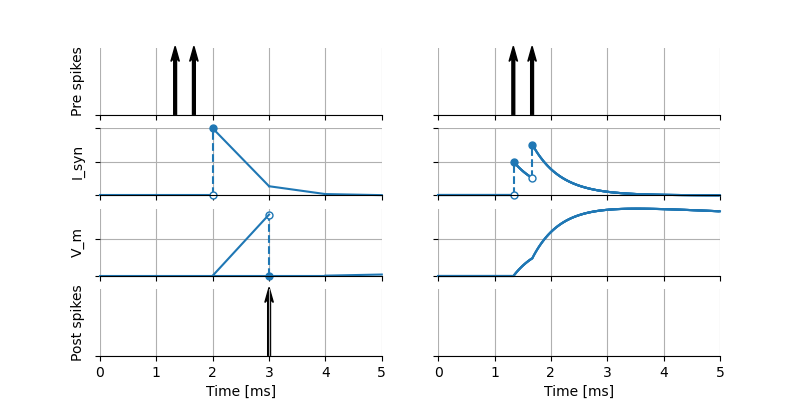
On the left, both pre-synaptic spikes are only processed at the end of the interval in which they occur. The statements in the update block are run every timestep for a fixed timestep of \(1~\text{ms}\), alternating with the statements in the onReceive handler for the spiking input port. Note that this means that the effect of the spikes becomes visible at the end of the timestep in \(I_\text{syn}\), but it takes another timestep before integrate_odes() is called again and consequently for the effect of the spikes to become visible in the membrane potential. This results in a threshold crossing and the neuron firing a spike. In the right panel in the figure, the same presynaptic spike timing is used, but events are processed at their exact time of occurrence. In this case, the update statements are called once to update the neuron from time 0 to \(1~\text{ms}\), then again to update from \(1~\text{ms}\) to the time of the first spike, then the spike is processed by running the statements in its onReceive block, then update is called to update from the time of the first spike to the second spike, and so on. The time courses of \(I_\text{syn}\) and \(V_\text{m}\) are such that the threshold is not reached and the neuron does not fire, illustrating the numerical differences that can occur when the same model is simulated using different strategies.
Guards
Variables which are defined in the state and parameters blocks can optionally be secured through guards. These guards are checked when the variable is assigned a value.
block:
    <declaration> [[<boolean_expression>]]
e.g.:
parameters:
    t_ref ms = 5 ms [[t_ref >= 0 ms]] # refractory period cannot be negative
Comments in the model
When the character
#appears as the first character on a line (ignoring whitespace), the remainder of that line is allowed to contain any comment string. Comments are not interpreted as part of the model specification, but when a comment is placed in a strategic location, it may be printed into the generated code.Example of single or multi-line comments:
To enable NESTML to recognize which element a comment belongs to, the following approach is used: there should be no white line separating the comment and its target, and the comment should be placed before the target line or on the same line as the target. For example:
If a comment shall be attached to an element, no white lines are allowed.
Whitelines are therefore used to separate comment targets:
The text of each comment is interpreted as Sphinx reStructuredText format.
Documentation for a model may appear directly in front of the model definition, akin to Python “docstrings” (see PEP 257 “Docstring Conventions”). For example:
The documentation block is rendered as HTML on the models library.